


Yes, data recovery is possible on an SSD if you act quickly. If you accidentally delete a file or format a healthy drive, recovery software can retrieve it before the automated TRIM command runs its cleanup loop. But if the drive has been idle for a while after erasure, your chances drop.
SSD Data Recovery: DIY Steps, Professional Services, Costs, and Prevention
You can recover data from an SSD, but the success depends on how fast you disconnect the power to beat your device’s automatic internal cleanup system. Yes, SSDs’ microchip arrays are actively deleted by an automated feature known as TRIM. To save your files, you must freeze the drive’s operations immediately before this background process destroys them permanently.
Here you will understand complete SSD data recovery: when to try DIY data recovery and when to go for professional help. How solid-state architecture changes the recovery rules, step-by-step DIY software process, and advanced professional cleanroom engineering secrets to restore data before it is permanently gone. Let’s see how to recover your data from the danger zone before the clock runs out!
What is SSD Data Recovery?
SSD data recovery is the technical process of reconstructing and recovering lost, deleted, corrupted, or inaccessible files from a Solid-State Drive’s flash memory chips. This is different from traditional hard drive repair and recovery, which store data mechanically on spinning magnetic platters. SSDs store data electronically inside grid-like structures called NAND flash memory cells.
The important detail that most people and generic recovery guides miss is that SSD data recovery is a race against an automated clock. This is not just a search for missing files.
On an SSD, a background optimization command called TRIM commands the drive to completely clear the storage cells, so if there’s any data, it removes it to keep write speeds fast.
So, SSD data recovery is not just about scanning a file system; it’s about intercepting the data before the TRIM command erases the data. If TRIM has already run, the data is fundamentally gone; the drive must be left isolated, as it is the only factor now in recovery success.
The TRIM Command
Data recovery faces a unique challenge when scanning solid-state hardware, i.e., the TRIM command. It is a system-level notification protocol known as the Advanced Technology Attachment (ATA) command for SATA drives and the Deallocate command for NVMe storage.
This communicates between the operating system’s file manager and the storage controller. Its specific purpose is to notify the drive firmware that particular data clusters are no longer tracking active files.
How Does TRIM Work?
The execution of the TRIM command follows a three-stage hardware automation process:
- Address Dispatch: When a directory index changes during file deletion, the operating system marks the block and immediately starts the TRIM command over it.
- Firmware Mapping: The Flash layer receives the addresses. It updates them as empty or invalid, and removes them from the active data map.
- Electrical Reset (Garbage Collection): During the next millisecond, the driver controller starts Garbage Collection. It moves any good data out of the way, creating blank spaces.
Common Signs of SSD Failure
Since SSDs begin the TRIM process instantly, it is important to notice the early warning signs of SSD failure to prevent permanent data loss. SSDs don’t show any physical warning signs like HDDs’ clicking or grinding sounds because they have no moving parts.
Here are the most common SSD failure signs that you must not ignore:
- You face frequent system crashes and blue screens (BSOD) while working on your system. Often, unexpected restarts also indicate SSD failure in PCs.
- Random files or folders suddenly vanish, or your computer asks to repair a drive partition on boot.
- The drive locks itself so you only have view access. You can’t save new data or modify settings.
- Saving and copying small files takes hours or freezes completely because the flash cells cannot discharge properly.
- The SSD randomly unmounts and remounts itself during heavy file transfers.
DIY SSD Data Recovery
You can recover data from an SSD by immediately cutting off its power supply, connecting it to a secondary computer via an external enclosure, and deploying specialized data recovery software for SSD to clone and extract your files. And because the TRIM command deleted data instantly, this is a critical job to be done as soon as possible.
Before running any DIY recovery software, complete the baseline checklist to prevent permanent data erasure:
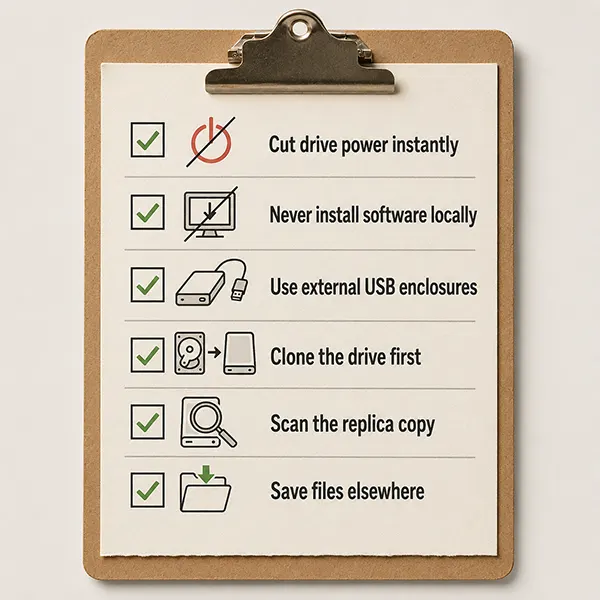
- Cut drive power instantly
- Never install software locally
- Use external USB enclosures
- Clone the drive first
- Scan the replica copy
- Save files elsewhere
DIY SSD Data Recovery Process: Step-by-Step
The following are the steps to recover your data from an SSD using specialized software safely:
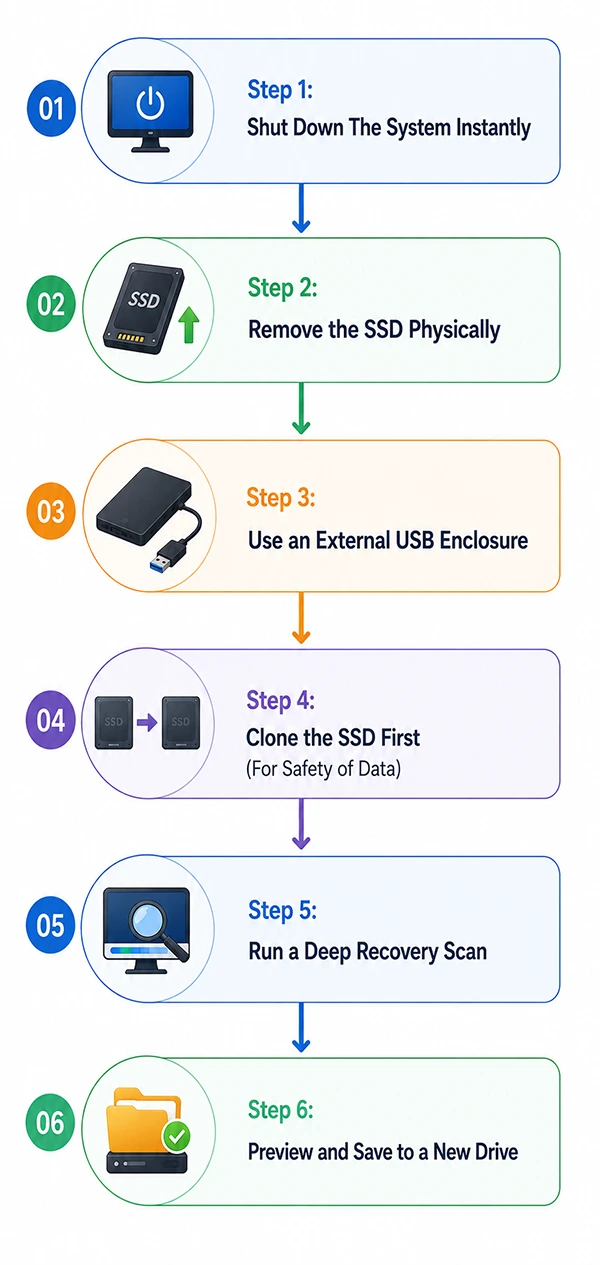
Step 1: Shut Down The System Instantly
Turn off your computer immediately by following a proper shutdown process (do not shut the laptop down directly using the power button).
Step 2: Remove the SSD Physically
Unplug your computer’s power cable or remove the laptop battery. Unscrew the case and physically take out the SSD from its motherboard.
Step 3: Use an External USB Enclosure
Insert the removed SSD into an external USB-to-SATA or USB-to-NVMe enclosure. Now, connect this to another separate working computer. This will block the host computer from sending a TRIM signal to the drive.
Step 4: Clone the SSD First (For Safety of Data)
Do not scan the drive directly. Use a tool to create a byte-by-byte backup image of the SSD. After this, you have a safe digital copy to work on.
Step 5: Run a Deep Recovery Scan
Now download and launch your data recovery software for SSD and target the cloned backup image you just created. Run a deep scan to look for remnants of the lost partition or corrupted file signatures.
Step 6: Preview and Save to a New Drive
Now that your files are recovered, preview them. Export them onto a healthy internal or external drive. Never save them on the original damaged SSD.
How Much Does SSD Data Recovery Cost?
Before you contact a professional lab or buy recovery software, it is important to understand the cost. SSD data recovery costs vary widely because pricing is determined by the type of drive failure rather than the size or volume of data you want to retrieve.
In this section, we will break down the average cost you can expect for SSD data recovery.
- DIY SSD Data Recovery Software ($0 – $100): Best for healthy drives with accidental file deletions. There are many free data recovery software programs on the market that you can use. Also, for advanced features, you can pay a licensing fee for consumer software.
- Logical and Corruption Repair ($150 – $400): Required when a drive becomes unreadable or turns into a “RAW” partition. Specialists use software tools to safely clone the filesystem.
- Firmware Failure Fixes ($400 – $800): Necessary when the computer cannot detect the drive. Engineers use factory hardware tools to bypass broken firmware code.
- Physical and Chip-Level Surgery ($800 – $2,200+): Needed after power surges or water damage. Technicians physically de-solder memory chips to extract raw data.
* Pricing reflects industry averages. Always choose labs offering free evaluations and a “No Data, No Fee” guarantee.
Professional SSD Data Recovery Services
When do-it-yourself software tools fail to recognize your drive, your last remaining option is to ship your hardware to a professional laboratory.
Professional SSD data recovery service is a highly specialized engineering process where cleanroom technicians use advanced hardware to fix your drive and recover the data safely. When you know the SSD is in the worst condition, trying DIY data recovery will only worsen the case, so it is highly recommended to go for SSD data recovery service in such situations.
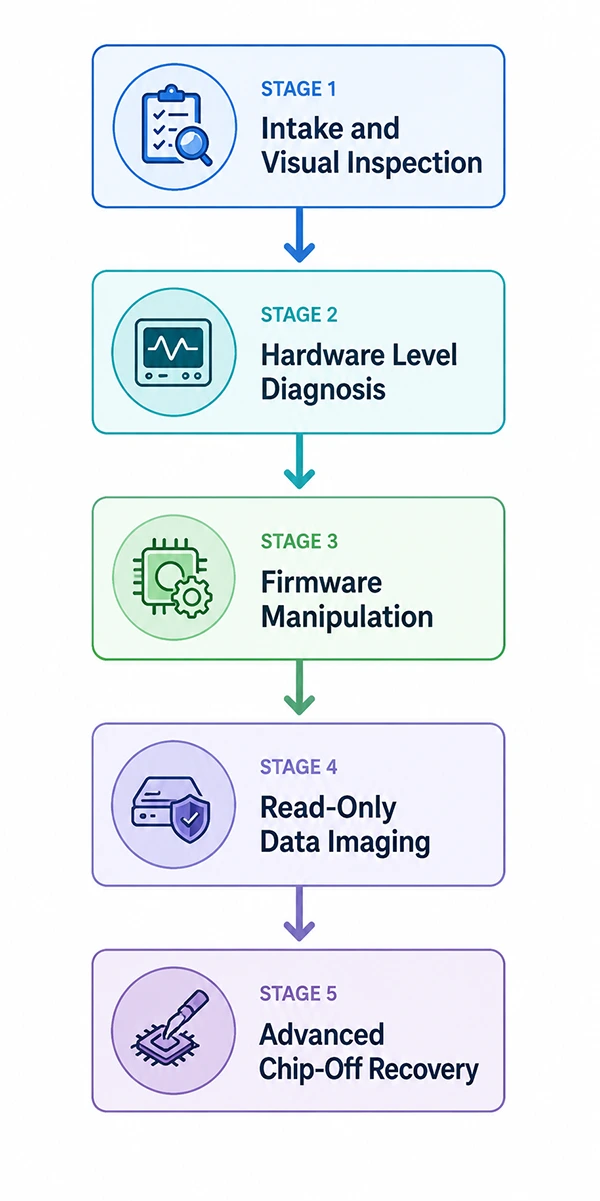
Stage 1: Intake and Visual Inspection
When the drive enters the lab, it is handled in ESD-safe environments. Engineers perform high-magnification microscopic examinations to identify the physical defects on the drive (such as burnt, cracked, or liquid corrosion).
Stage 2: Hardware Level Diagnosis
Tracking voltage draw to pinpoint whether the issue is an electrical short or corrupted parts. This stage identifies the root cause of the failure and leads to the right recovery plan.
Stage 3: Firmware Manipulation
If the drive is unrecognized due to firmware failure, engineers use custom diagnostic controllers to force the SSD into safe factory mode. They patch the damaged sections so that the drive can safely read and map the internal structure again.
Stage 4: Read-Only Data Imaging
Labs don’t work directly on your original device. They create a byte-by-byte replica copy of the storage sectors. This prevents further damage during the process.
Stage 5: Advanced Chip-Off Recovery
So, when the master controller chip is destroyed, technicians physically desolder the NAND flash storage microchips off the circuit board. They place these chips into hardware readers.
What Are The Best Practices to Prevent SSD Data Loss?
The best recovery plan is the one you never have to use. So, along with knowing how to handle emergency SSD data recovery, having foolproof protection around your data is important. By making a few small adjustments to how you treat your hardware today, you can completely remove the worry of dealing with a broken drive tomorrow.
- Activate Windows Backup or Time Machine: Configure your system’s built-in tools to copy your data folders onto an external storage drive every single day automatically.
- Keep 15% of the Drive Empty: SSD chips require empty space to shift files around safely. Filling a drive completely can cause wear and tear on the silicon cells.
- Install manufacturer Software: Run basic diagnostic commands monthly to look for any real warning signs.
- Check S.M.A.R.T. Health Status: Run basic diagnostic commands or use free drive-checking software once a month to look for internal warning signs. These reports show hidden electronic issues, block reallocations, etc. before they scale.
- Use an Uninterruptible Power Supply (UPS): For the desktops, connect them to a battery backup system to prevent sudden voltage loss from corrupting active files during write cycles.
- Safe hardware Ejection: Always select the software “Eject” option before physically disconnecting any external portable SSD from a live USB port.
- Use Cloud Synchronization: Link your important files or folders to automated cloud storage platforms like OneDrive, Google Drive, iCloud, etc., to save offsite duplicate files.
Conclusion: Recover Your SSD
For SSD data recovery, it’s important to act quickly. Shut down your computer to stop the automated TRIM command from wiping your files. This increases your chances of data recovery. Whether you use DIY recovery software for minor file deletions or hand your drive over to advanced cleanroom lab engineers for microscopic hardware surgeries, your data can be recovered safely.
Moving forward, the best way to handle data recovery SSD, is to prevent it before it ever happens. By setting up automated backups, using power surge protectors, and doing regular drive checkups, you protect your data. Your files are irreplaceable, so treat your storage hardware with care and stay backed up so you never have to face the recovery situation again.
Frequently Asked Questions
Is data recovery possible on SSD?
Can data recovery work on SSD not detected?
Yes, but not through standard commercial software. If your computer’s BIOS cannot see the drive, software tools are useless. You must send the SSD to a professional laboratory where engineers use hardware data imagers to bypass corrupted firmware circuits and read the internal NAND cells directly.
Is it possible to revive a dead SSD?
You can temporarily revive a dead SD for data extraction, but it cannot be safely repaired for daily reuse. Professional labs can patch corrupted controller firmware and damaged electronics to make the drive readable again. Once the data is securely copied off, the fragile SSD should be discarded.
What is the average lifespan of an SSD?
The average lifespan of a modern SSD is between 5 and 10 years.
Do data recovery look at your files?
Reputable data recovery engineers only verify the file integrity and do not manually browse your personal content. Top-tier labs work under strict privacy laws and non-disclosure agreements (NDAs) to guarantee absolute data confidentiality.
Is deleted data gone forever?
The data is not gone immediately, but it becomes permanently inaccessible much faster than on an HDD. The moment you delete a file, it remains hidden in the background. But the SSD’s automatic TRIM command quickly clears out those empty blocks during idle times.
Related Blogs
You Might Also Like
8 min read
BitLocker Recovery Key: Why You Need It and Where to Find It A BitLocker recovery key is a unique, 48-digit numerical password automatically generated to protect your Windows computer from data theft.…
Data Recovery
September 22, 2026
8 min read
How to Check Hard Drive Health (No Software Downloads Required) You can check your hard drive health for free using your computer’s built-in tools like Windows CHKDSK terminal command, macOS…
Guides
September 14, 2026
8 min read
5 Best Free Data Recovery Software: Features, Limits, and Alternatives Finding reliable 100% free data recovery software requires searching through thousands of sites and data-capped trials. In this guide, we…
Data Recovery
August 24, 2026
8 min read
Data Error Cyclic Redundancy Check (CRC): What It Means, Causes, and How to Fix… A Data Error Cyclic Redundancy Check means that your system has detected corrupted data on your storage drive. This happens…
Data Recovery
August 24, 2026
8 min read
Hard Drive Repair: How to Diagnose, Fix, and Recover Data From a Failing Drive Hard drive repair is the process of fixing a broken (logically or physically) storage drive to get your files back.…
Data Recovery
August 13, 2026
8 min read
How to Recover Files After Shift+Delete? Data Recovery Hacks We were browsing Reddit recently and noticed that the forums are packed with people asking queries like: “Need advice on…
Data Recovery
August 11, 2026