


Yes, you can recover data on your own using DIY data recovery tools, but only if your drive is physically healthy. It is perfect for recovering data after accidental file deletion, corruption, lost partitions, or unintentional quick formatting.
What Is DIY Data Recovery and How Does It Work?
Your file is accidentally deleted, or let’s assume there was some software issue and you cannot get your files back. Your first instinct is to fix it yourself; that is called DIY data recovery. It is the process of using commercial software or built-in tools to rescue lost or deleted data.
But is your drive actually safe to recover? The answer depends on the health of your drive. If there’s a logical error like formatting or any software glitches, DIY methods are highly effective. But in case your drive is clicking or physically failing, any DIY attempt will not work.
What is DIY Data Recovery?
DIY data recovery is the digital first aid for file deletion for any reason. It is the process of using downloadable or built-in software tools to restore missing files on your own. You don’t ship your drive to a lab; you try data retrieval from your desk. It is fast, affordable, and highly convenient for common data deletion mishaps. Now let’s see: is DIY data recovery safe or not?
When DIY Data Recovery is Safe?
If your storage drive is physically healthy but your data is missing due to a user error or a minor software glitch, you are completely safe to try a DIY data recovery. In these logical data loss situations, the drive spins normally (no strange noise) and is easily detected by your computer.
Common situations when DIY data recovery is safe:
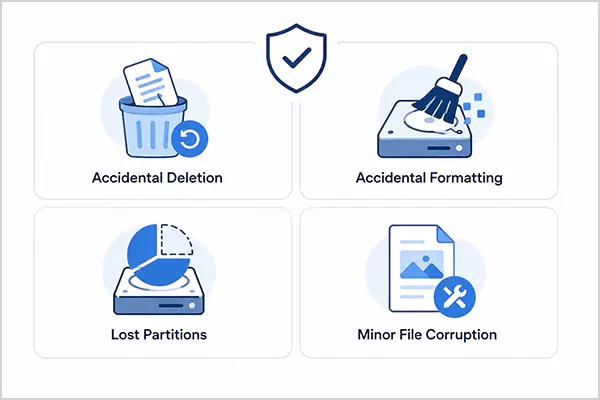
- Accidental Deletion: You emptied the Recycle Bin or Trash and the files are no longer there. Also, if you want to recover files after Shift + Delete, in this case, DIY data recovery is highly possible.
- Accidental Formatting: Erasing the drive by mistake is fixable if you stopped using the drive immediately.
- Lost Partitions: If a drive volume suddenly goes missing due to a minor partition table error. The data can be recovered.
- Minor File Corruption: Software crashes that leave specific files unreadable while the hardware remains stable.
When to Avoid DIY Data Recovery?
A drive making clicking or grinding noises while running shows physical failure. Also, overheated or puffed hard drives show physical damage. In such cases, there are DIY data recovery risks; so you should completely avoid DIY data recovery. If you try to run software on a physically failing drive, the mechanical components stress-test themselves, which destroys your files forever.
When to avoid DIY data recovery:
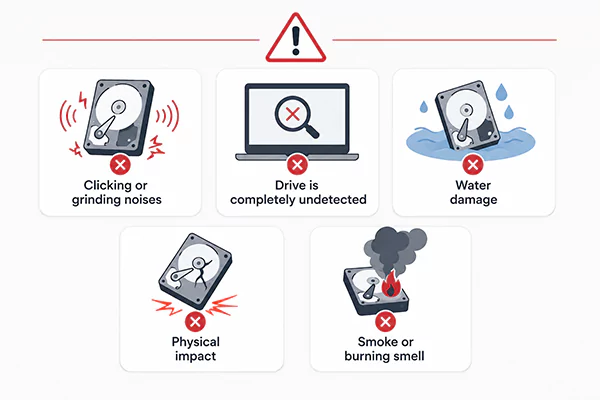
- Clicking or grinding noises: Unusual hardware sounds mean the mechanical internal heads are actively failing.
- Drive is completely undetected: If your computer, BIOS, or Disk Management Utility cannot see the drive, it means there’s a major issue.
- Water damage: Liquid contact with the drive can cause electrical shorts and corrosion inside the drive, making it difficult to read the data inside.
- Physical impact: Any physical damage can cause internal mechanics to dislocate or be damaged. So, if the drive accidentally dropped or you can visibly see any damage, there is a DIY recovery risk.
- Smoke or burning smell: Electrical shorts on the drive’s circuit board damage the internal components, making DIY data recovery impossible.
How Does DIY Data Recovery Work?
DIY data recovery depends on how the operating system handles file allocation and storage management. When a file is deleted, the operating system does not immediately erase the binary data from the physical sectors of the drive. It modifies the file system metadata such as the Master File Table (MFT) in NTFS or the inode table in EXT4 to mark the clusters occupied by that file as “unallocated” space.
Tip: Always clone your failing drive first, then run your recovery software on that duplicate copy.
Data recovery process:
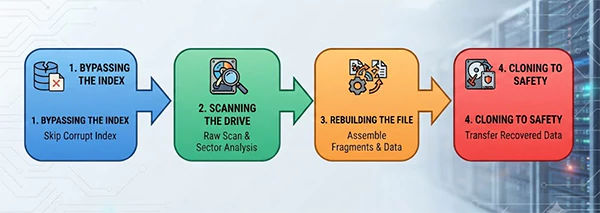
- Bypassing the index: The recovery process doesn’t stop due to your broken or missing filesystem; it bypasses them and goes directly to the hidden raw sector for data retrieval.
- Scanning the drive: Every tiny block of storage is carefully read from start to finish. All the unallocated space is scanned to recover any patterns left behind by lost files.
- Rebuilding the file: All the scattered pieces are collected and matched according to their binary streams back into a complete, healthy file.
- Cloning to safety: Your recovered files are saved to a secure location. The process ensures that the original drive remains untouched and safe from being overwritten.
This DIY data recovery is done using data recovery software. We’ll see what is data recovery software, its role here, and how it works in the following section.
The Role of Data Recovery Software
Data recovery software is designed for DIY recovery without any professional help. The software bypasses the broken or altered index and scans the entire drive block by block. It searches for raw files left behind. Once the files are detected, it pieces the fragments back together. And you can finally save the files to a completely different healthy drive.
The primary function of this software is automated extraction. Rather than forcing you to manually read raw hexadecimal code, the software does the process on its own; you just have to command it.
Here is what the software handles during a recovery attempt:
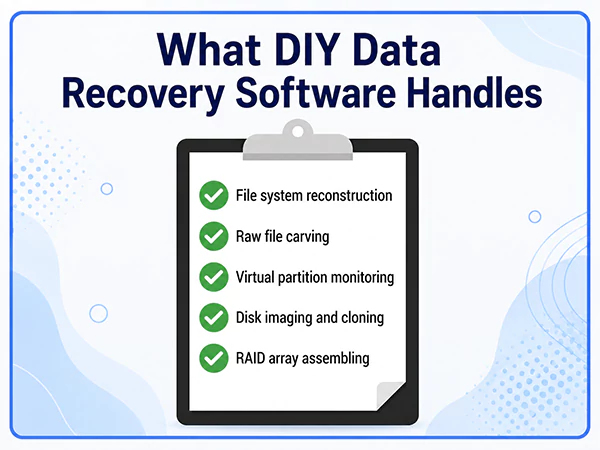
- File system reconstruction: The rebuilding of the drive’s broken index map. It puts the damaged directory back together. So, now you can see your original folders and files exactly where they used to be before the crash.
- Raw file carving: Searches for files when the index is absent. It digs directly into raw data blocks. Scans for unique file patterns to piece them back together manually.
Virtual partition monitoring: It tracks down the drive section that is inaccessible or has disappeared. Make them visible again. This way, the software safely scans those hidden areas for lost files. - Disk imaging and cloning: This creates a perfect copy of your failing drive. You can then run DIY data recovery scans on this safe replica. It protects your original hardware from further overwriting.
- RAID array assembling: This virtually puts together multiple linked hard drives and calculates how files were scattered across units. Then recovers data even if the physical controller fails.
Note: Running scans on physically damaged hardware and accidentally overwriting original data are major data recovery software risks. These mistakes can turn a minor glitch into permanent data loss.
DIY vs Professional Data Recovery
So now we have seen all about DIY data recovery. But what if the drive is physically damaged, and you still want to recover the data? What to do then? Go for professional recovery services.
DIY data recovery means using consumer applications to extract data from physically stable drives, but professional data rescue is done in advanced laboratories where engineers physically rebuild failing hardware under sterile conditions. DIY data recovery is a low-cost solution, whereas professional recovery comes with a high cost.
Let’s give you a clear picture of what you will be dealing with in each of the recovery methods.
| Comparison Factor | DIY Data Recovery | Professional Data Recovery |
| Definition | Software-based file recovery at your own | Lab-based hardware repair and data recovery by cleanroom engineers |
| Where it can be done | At home or in an office right from your own desk | Inside an ISO-certified cleanroom laboratory |
| Hardware & software requirements | A functional computer, data recovery software, a secondary healthy drive | Sterile benches, matching donor parts, specialised tools, etc. |
| Average cost | $0 to $100 (Free tools or one-time license fees) | $300 to $2,000+ (Based on damage severity) |
| Process | Disconnect > Install > Connect > Scan > Restore | Submit > Ship > Review file list > Perform Recovery > Deliver Drive |
| Turnaround time | Immediate. Scans take a few hours to complete. | 2 to 14 business days plus shipping times |
| Technical Risk | High | None |
| Data confidentiality | Total control as data stays on your machine | Files handled by third-party laboratory technicians |
| Recovery limitations | Logical glitches only | Can solve both mechanical and software failures |
| Pros | Budget friendly Instant deployment Complete privacy No shipping delays | Highest possible recovery success Zero risk of accidental overwriting |
| Cons | No support for mechanical damage User errors can delete data permanently | Financial cost Requires waiting days for results |
DIY or Professional? The Right Choice for Data Recovery
DIY data recovery is of great value but only if your drive is physically healthy. You can save files with a few clicks, which is also a win for your wallet. It turns accidental deletions and minor formatting issues into instant recovery.
But the important thing in DIY data recovery is to know your recovery limits. When your drive is clicking or grinding, or physically damaged, the benefits of DIY recovery will turn into a high-risk situation. This DIY data recovery works wonders for software glitches, but hardware failures always need professional data recovery. Evaluate your drive, prioritise your data safety first, and never run scanning software on a dying drive!
Frequently Asked Questions on DIY Data Recovery
Can I do data recovery on my own?
Can I recover data for free?
Yes, you can recover your data for free also. There are various free open-source DIY data recovery software and various built-in tools meant for free data rescue. Additionally, many premium recovery software offer a free trial that can be used to recover a certain limit of data for free.
Is it safe to try DIY data recovery on a physically damaged drive?
No. When you try to run DIY data recovery software on a physically damaged drive, the broken components forcibly grind against the spinning data platters. This permanently scratches the surface and destroys your data forever.
Does data recovery software delete your files during a scan?
No, reputable data recovery software only reads the data from your drive. If you save the recovered files onto the same drive you are scanning, you might overwrite the unallocated space and permanently destroy the files you are trying to recover.
How much does professional data recovery usually cost?
Professional data recovery ranges from $300 to $2,000+ depending on the type of storage media and the severity of the hardware damage.
Related Blogs
You Might Also Like
8 min read
BitLocker Recovery Key: Why You Need It and Where to Find It A BitLocker recovery key is a unique, 48-digit numerical password automatically generated to protect your Windows computer from data theft.…
Data Recovery
September 22, 2026
8 min read
How to Check Hard Drive Health (No Software Downloads Required) You can check your hard drive health for free using your computer’s built-in tools like Windows CHKDSK terminal command, macOS…
Guides
September 14, 2026
8 min read
SSD Data Recovery: DIY Steps, Professional Services, Costs, and Prevention You can recover data from an SSD, but the success depends on how fast you disconnect the power to beat…
Data Recovery
September 7, 2026

8 min read
5 Best Free Data Recovery Software: Features, Limits, and Alternatives Finding reliable 100% free data recovery software requires searching through thousands of sites and data-capped trials. In this guide, we…
Data Recovery
August 24, 2026
8 min read
Data Error Cyclic Redundancy Check (CRC): What It Means, Causes, and How to Fix… A Data Error Cyclic Redundancy Check means that your system has detected corrupted data on your storage drive. This happens…
Data Recovery
August 24, 2026
8 min read
Hard Drive Repair: How to Diagnose, Fix, and Recover Data From a Failing Drive Hard drive repair is the process of fixing a broken (logically or physically) storage drive to get your files back.…
Data Recovery
August 13, 2026